Friday, October 14, 2011

Digital Tutors : Exploring Animation Principles in 3ds Max 2011: Squash and Stretch

Exploring Animation Principles in 3ds Max 2011: Squash and Stretch 
                                                                 
In this collection of lessons we will learn about the animation principle of squash and stretch. This course will delve in the animation principle of squash and stretch in 3ds Max. The goal of this course is to provide you with a deeper understanding of what squash and stretch is all about. We'll cover everything from learning a technique for automating squash and stretch that computes fast, to exploring ways it can be used to add more flexibility to characters.
Here you will  get some additional animation stuffs also.


Download from


DON't  FORGET  TO  CLICK  FOR  A  "+1"

Saturday, October 8, 2011

Morph a text to smoke or dust by FxFx.org
 Morph a Text to Smoke or Dust by FxFx.org

Size:94.00 mb

This tutorial is going to teaches you how to turn a text into a particle (dust, smoke).This effect can be used  this  in your intros, logo animations, object morphs etc. With Maya’s powerful particle dynamic system, you can turn your particles anything you wish. Like smoke, dust, clouds etc.


DOWNLOAD FROM

DON't  FORGET  TO  CLICK  FOR  A  "+1"

Friday, October 7, 2011

UNDERSTANDING STEREOSCOPY IN 3DS MAX


Stereoscopy is one of the great techniques that uses in 3d sofwares to show depth. One of the popular one is Anaglyph, in Anaglyph we use red and blue glasses to watch movie. In this learning package I have shown you how to create cameras and prepare your scene for anaglyph stereo also at the end, use Adobe Photoshop to mix images.

DOWNLOAD FROM


DON't  FORGET  TO  CLICK  FOR  A  "+1"

Monday, October 3, 2011

NUKE 101: Professional compositing and Visual effects

NUKE 101: Professional compositing and Visual effects

pdf | 31.00mb

This book is for anyone interested in learning Nuke. Whether you’re an artist experienced in using Adobe After Effects, Autodesk Flame, Apple Shake, or Eyeon Fusion, or you only have a basic understanding of compositing and image manipulation concepts, this book will guide you through the necessary theory and practice you need to use Nuke—from a basic level to Nuke’s more advanced toolset

                                                                             CONTENT

                                                         Chapter 1. Getting Started with Nuke
                                                         Chapter 2. Touring the Interface with a Basic Composite
                                                         Chapter 3. Compositing CGI with Bigger Node Trees
                                                         Chapter 4. Color Correction
                                                         Chapter 5. 2D Tracking
                                                         Chapter 6. RotoPaint
                                                         Chapter 7. Keying
                                                         Chapter 8. Compositing Hi-Res Stereo Images
                                                         Chapter 9. The Nuke 3D Engine
                                                         Chapter 10. Camera Tracking
                                                         Chapter 11. Camera Projection
                                                         Chapter 12. Customizing Nuke with Gizmos


DOWNLOAD FROM


Attention: AS IT IS A .epub FILE, PLEASE DOWNLOAD  ONE OF THE FOLLOWING TO BE ABLE TO READ THE TUTORIAL


DON't  FORGET  TO  CLICK  FOR  A  "+1"

Sunday, October 2, 2011

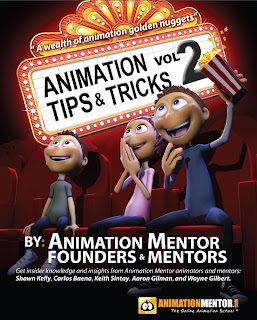
Animation Tips & Tricks Vol.2 : by ANIMATION MENTORS
Animation Tips & Tricks Vol.2 :  by ANIMATION MENTORS


                                                                  pdf | 13.00mb                                  
       
            Animation Tips & Tricks Volume 2 is a 70 pages PDF document with a collection of the best tips, advices and resources published on the   Blog. You will find most of the same content published in the blog but being free, collected in one comfortable document you could also print, makes the deal. It strikes for the simplicity of some answers to some of the most important questions an animator, being a student or an emergent professional, keeps on asking.
           
           Get Vol.1 also in this blog.

                                                                                                   Download From


DON't  FORGET  TO  CLICK  FOR  A  "+1"

Saturday, October 1, 2011

FREE INSTANT BACKLINKS FOR YOUR BLOG & WEBSITE


    An instant,fast and immediate automatic backlinking solution  for optimizing your blog or web page on search engines result.Everyone knows To get a good rank in google  and other search engines it is important get more & more backlinks .Here, we offer a backlink for free and very fast for your sites.
     
      To view your backlink you can click the image link from your website or blog. And well... your website url done and will be displaying in first references.If any visitors click this banner from your website or blog, your url backlink will be creating automatically in this website.You can build backlink as many as you want, no limitation and restriction, but no spam !

To get the gadget do the  following
       
       1.Copy the html code first (no change needed)
 2.Paste to your website or blog(anywhere)
                       3.click on the button to create backlinks to your website


                HTML CODE FOR THE GADGET


 *Attention: Click for a +1 below for this post.
Leave your enmail id in the comment box.
A new HTML code of a gadget will be sent to you Which will Double your backlinks


Wish your website's ranking quickly on Top Google, Yahoo and Alexa!


DON't  FORGET  TO  CLICK  FOR  A  "+1"
Friday, September 30, 2011

CGTuts+: Create a Jumping Lamp Animation in C4D  
                        CGTuts+ :Create a Jumping Lamp Animation in C4D


                                                                                                            4 lessions| .avi file| 629.00mb
It will teach using the initial modeling tools, creating a rig , use constraints, change the type of keyframes, how to use the auto key option,  paly with the time line, cleaning up keyframes,pplying the materials to objects,light arrangement ,  finally  render the animation. Everything you need to quickly get into Cinema4D.


DOWNLOAD FROM:


Reload the links if not lodad in first time

DON't  FORGET  TO  CLICK  FOR  A  "+1"
Twitter Bird Gadget